
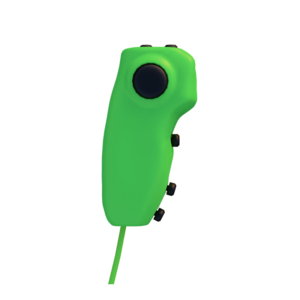
 ERGO KING ONE HANDED PC CONTROLLER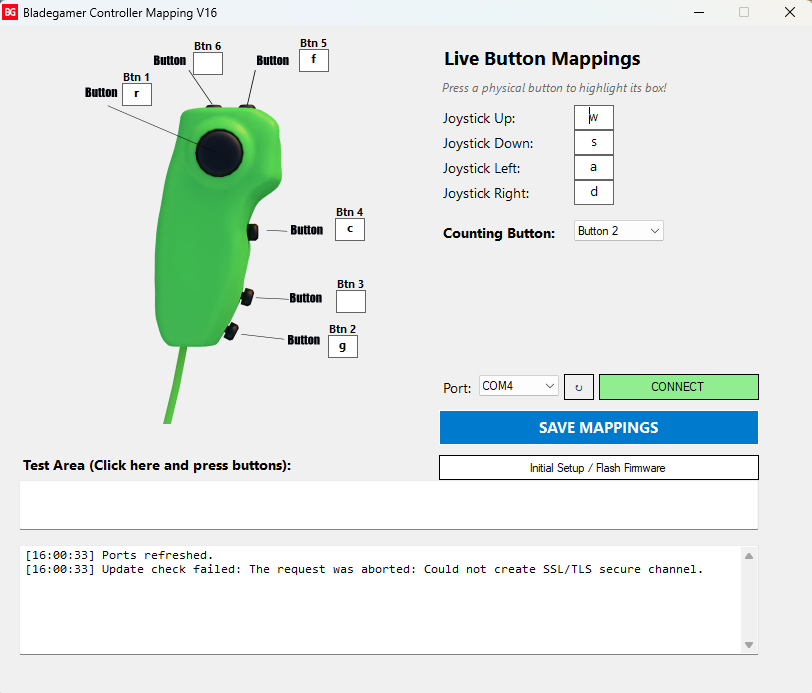
Description
Remap Your Ergo King. Play Your Way.
This is the BladeGamer Ergo King Controller Button Remapping Software. Get more control from your BladeGamer Ergo King One Handed Controller with easy-to-use button remapping software.
The software allows you to remap the buttons on your Ergo King Controller, giving you the freedom to customise your controls for different games, genres and playstyles. Put the controls exactly where you want them and create a setup that feels natural to you.
Complete Button Remapping
The Ergo King One Handed Controller is designed to give you a comfortable and flexible gaming experience. With the BladeGamer remapping software, you can customise your controller buttons to suit your individual preferences.
Whether you want to move an important action to an easier-to-reach button, create a different control layout for a specific game, or simply personalise your Ergo King, the remapping software puts you in control.
Designed for the Ergo King
Built specifically around the BladeGamer Ergo King One Handed Controller, the software makes it simple to configure your controller and create the setup you want.
Key Features:
- Remap the buttons on your Ergo King Controller
- Customise your Ergo King One Handed Controller layout
- Create controls suited to your personal playstyle
- Make frequently used actions easier to reach
- Quickly adjust your button configuration for different games
- Designed for the BladeGamer Ergo King
- Simple and intuitive controller configuration
Your Controller. Your Controls.
Everyone plays differently. The BladeGamer Ergo King button remapping software gives you the flexibility to configure your One Handed Controller around the way you play.
Set up your Ergo King, customise your buttons and build a controller layout that feels right for you.
BladeGamer Ergo King — One Handed Controller. Fully Customisable Controls.

Tom_T –
this software is absolutely brilliant it did exactly what I needed remapped all the buttons to what I wanted to my liking